Purpose
Use the upper right menu in the Maritime Portal to manage your account, open services and get support.
Available to all users. Some options require administrator permissions.

Overview
- User Profile – Manage account and company context
- Help – Access support and overview of contacts
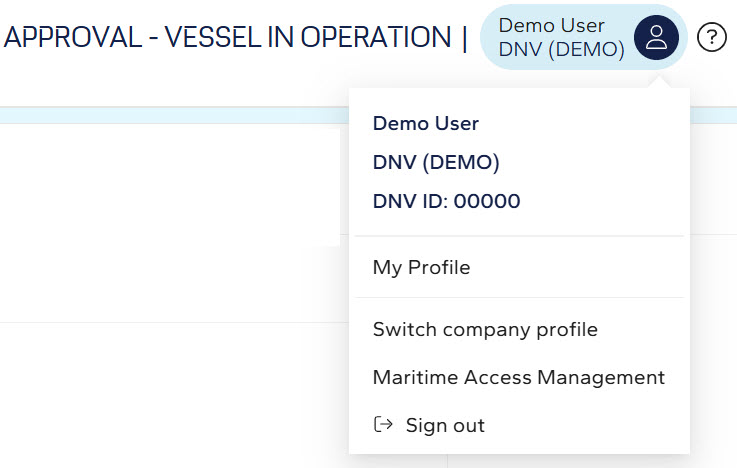
Use the User Profile menu
1. Select the User Profile icon.
2. Choose an option:
User Profile options
-
My Profile – View account details
-
Switch company profile – Change organization
-
Maritime Access Management – Manage roles (admin)
-
Sign out – Log out
Use the Help menu
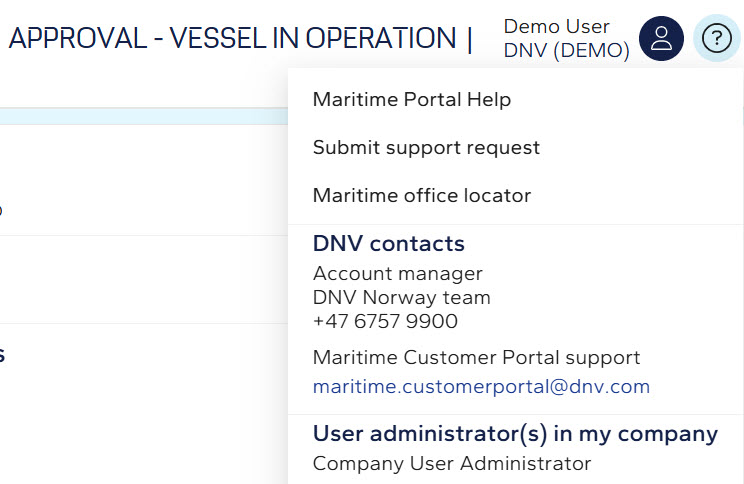
1. Select the Help icon.
2. Choose a support option.
Help options
- Maritime Portal Help
- Submit support request
- Maritime office locator
- Account manager contact
- Maritime Customer Portal support
- User administrators in my company
Notes
- Contact administrator for access
- Use support request for issues