Purpose
Use the upper right menu in the Maritime Portal to manage your account, open services, get support, and use AI assistance.
Available to all users. Some options require administrator permissions.

Overview
- User Profile – Manage account and company context
- Application Grid – Open other Maritime services
- Help – Access support and overview of contacts
- Ask AI – Get AI assistance
Use the User Profile menu
Here is a step-by-step guide to set up your profile, notification and make tailored fleet list.
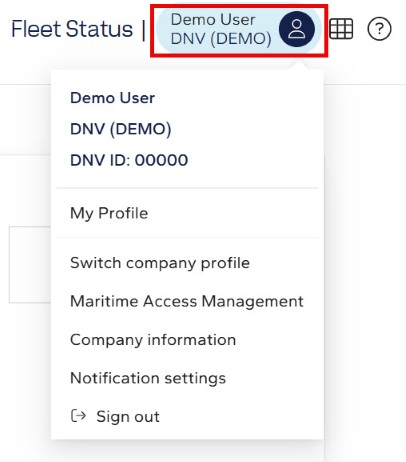
1. Select the User Profile icon.
2. Choose an option:
User Profile options
-
My Profile – View account details
-
Switch company profile – Change organization
-
Maritime Access Management – Manage roles (admin)
-
Company information – View company details
-
Notification settings – Configure alerts
-
Sign out – Log out
Use the Application Grid
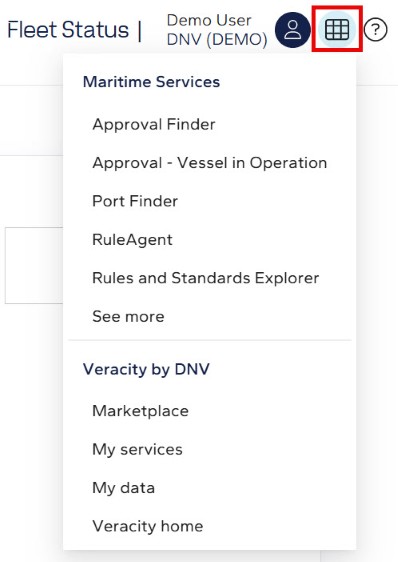
1. Select the Application Grid icon.
2. Select a service to open it.
Maritime services
- Approval Finder
- Approval – Vessel in Operation
- Port Finder
- RuleAgent
- Rules and Standards Explorer
- See more - link to Veracity Services where you will find more services
Veracity by DNV
- Marketplace
- My services
- My data
- Veracity home
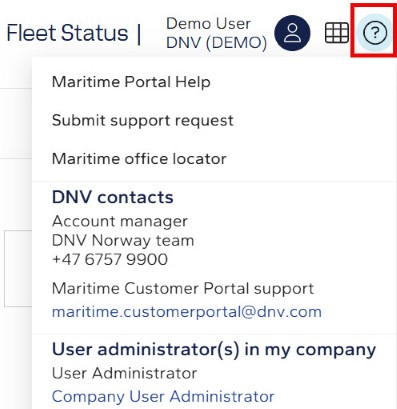
Use the Help menu
1. Select the Help icon.
2. Choose a support option.
Help options
- Maritime Portal Help
- Submit support request
- Maritime office locator
- Account manager contact
- Maritime Customer Portal support
- User administrators in my company