Use Port Finder to identify and explore ports
Use Port Finder in Veracity - My Services to find local DNV resources for the port you are calling, review key port information, and support survey planning.
Where to access Port Finder
You can open Port Finder from the DNV Maritime portal in the following ways:
- Via Veracity My Services
- Log in to Veracity
- Navigate to My Services
- Select Port Finder from the available services
- Via the application launcher (grid view)
- In the upper-right corner of the portal, select the grid view icon (application launcher)
- Locate and select Port Finder from the list of available applications
If you do not have access, contact your company administrator.
What you can do in Port Finder
Use Port Finder to:
- Search for a port by name, country, or location
- View port details such as coordinates and general information
- Use map-based navigation to visually identify ports
Find a port
Follow these steps to locate a port in Port Finder:
- Open Port Finder: https://maritime.dnv.com/PortFinder/
- In the search field, enter the port name, country, or keywords.
- Select a port from the search results list.
- Review the port details displayed on the page or map.
Use the map view
Follow these steps to explore ports using the map:
- Open Port Finder.
- Navigate the map using zoom and pan controls.
- Select a port marker on the map.
- Review the port information displayed in the details panel.
Result: The selected port is highlighted and its details are shown.
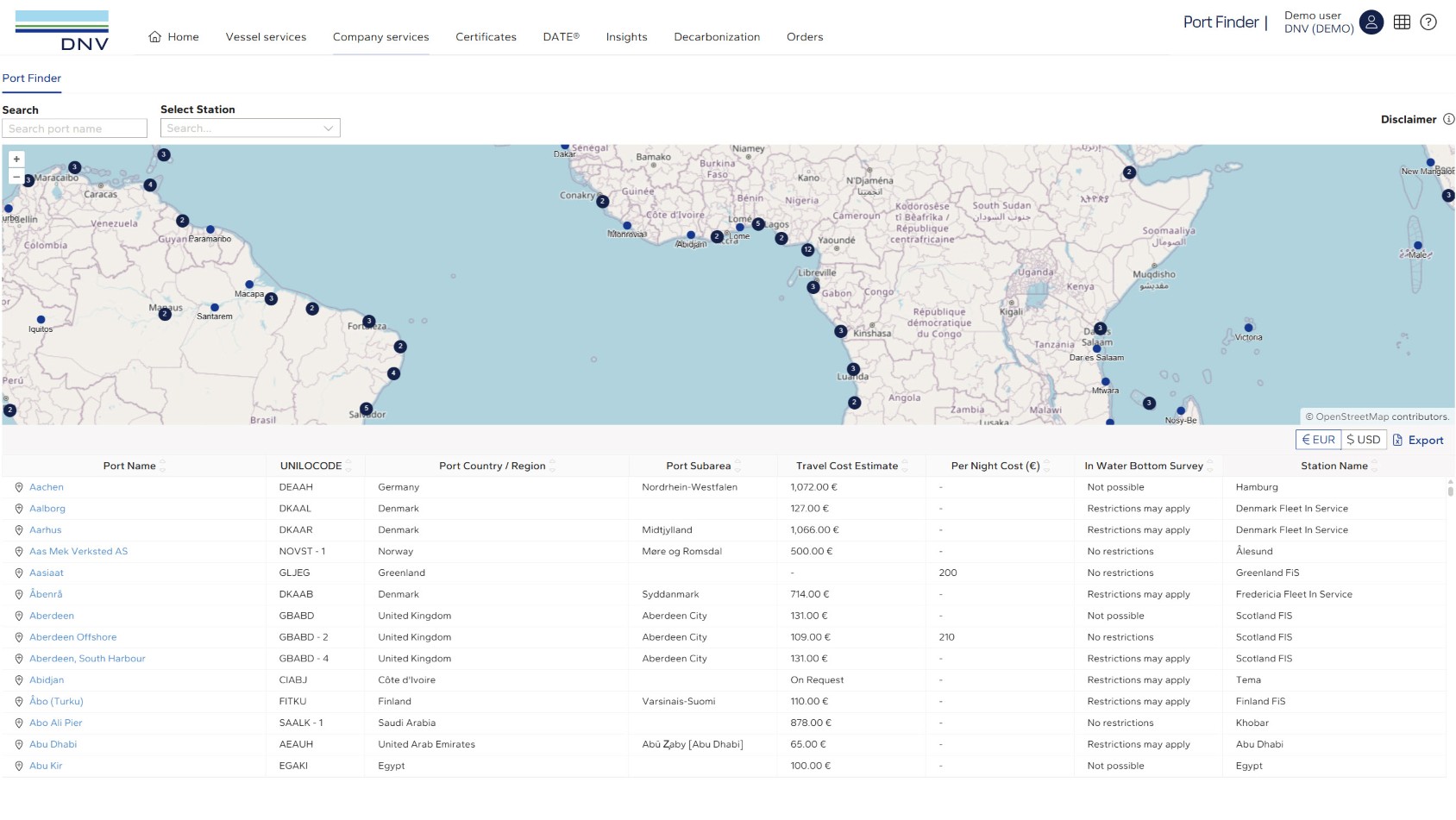
Understand port information
When you select a port, the system displays key information. Typical data includes:
- Port name – Official name of the port
- UNILOCODE – United Nations Code for Trade and Transport Locations.
- Port Country / Region – Port's country
- Port Subarea – Geographic position
- Travel Cost Estimate - Expected travel cost for DNV's surveyor or auditor
- Per Night Cost - Estimated accommodation cost for DNV's surveyor or auditor
- In Water Bottom Survey - Weather an in-water bottom survey can be carried out or not, of if restrictions may apply.
- Station name - DNV's Station name
Prerequisites
Before using Port Finder:
- You must have access to Fleet Status
- Your browser must allow map interaction
Notes
- Use specific port names for more accurate search results
- If no results appear, try alternative spelling or broader terms
- Map interaction may vary depending on browser or screen size