Veracity for Class Maritime Portal
RuleAgent
RuleAgent helps you find relevant DNV rule requirements in seconds by searching across the DNV Rules & Standards and related service documents.
You can ask natural language questions and receive summarised answers with direct rule references for verification.
Here is a step-by-step interactive guide on using RuleAgent and its features.
1. Open RuleAgent
Open RuleAgent from the portal.
You will see the main search interface where you can configure:
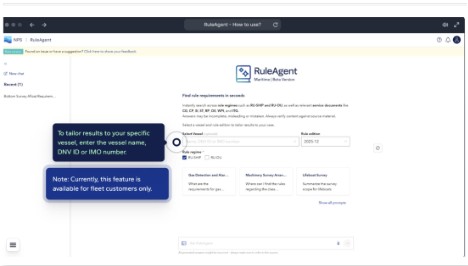
2. Select Vessel (Optional)
To tailor answers to a specific vessel, enter one of the following:
Selecting a vessel allows RuleAgent to consider:
Note: This feature is currently only available in Fleet status portal for owner and manager with access to classed vessels.
You can still use RuleAgent without selecting a vessel.
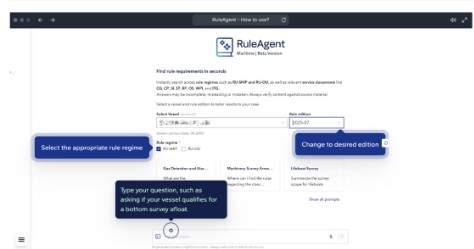
3. Choose Rule Regime
RuleAgent can search across different rule regimes.
Select the applicable regime:
Choosing the correct regime helps ensure the most relevant rule references are returned.
4. Select Rule Edition
Choose the rule edition relevant to your case.
Example:
Using the correct edition ensures the answer reflects the correct regulatory requirements for the vessel or project.
5. Ask Your Question
Enter your question in natural language.
Example questions:
RuleAgent will generate a structured summary of relevant requirements.
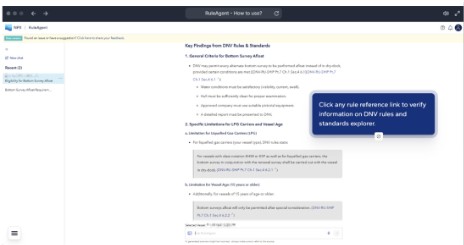
6. Verify the Answer Using Rule References
Each answer includes direct references to the DNV Rules & Standards.
Click any rule reference to:
Always verify the answer against the official rule text.
7. Example Workflow
Typical usage:
⚠️Important Disclaimer
RuleAgent responses are generated using AI and may contain errors or missing relevant requirements.
Always verify conclusions against the official DNV Rules & Standards and consult DNV experts when necessary.