Veracity for Class Maritime Portal
Table view
Each row represents one vessel. Click the arrows next to a column heading to sort the table.

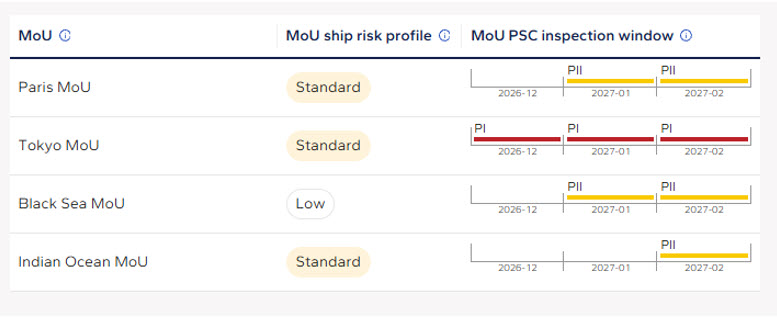
Clicking on a vessels line in the table will show you information on that vessels Ship risk and inspection window in MoUs with implemented calculation.
|
Column |
What it shows |
|
AIS ETA |
The estimated time of arrival at the destination as reported by the vessel via AIS. For a vessel that is moored or at anchor, its current location is shown instead, for example "Moored near Mundra Anchorage". |
|
Vessel name (IMO number) |
The vessel's name with its IMO number below. |
|
AIS status |
Whether the vessel is currently moving or moored, according to AIS. |
|
AIS destination / Port name |
The destination port code (UN/LOCODE) as entered in the vessel's AIS, with the port name below. |
|
MoU |
The PSC regime responsible for the destination port, for example Paris MoU, Tokyo MoU or US Coast Guard. |
|
Port activity |
How active PSC is in the destination port: Low, Standard or High. Low means no inspections in past 36 months |
|
MoU ship risk |
The vessel's risk profile calculated according to the rules of the destination MoU: Low, Standard or High. |
|
MoU PSC inspection window |
A timeline of the coming months showing whether the vessel is due for a periodic inspection under the destination MoU, or a message explaining why no window can be shown. |
|
Detention risk |
DNV's estimate of the vessel's risk of detention if inspected within the next 6 months: Standard or High. Available for DNV-classed vessels. |
|
Actions |
Opens the Checklist tool for the vessel. |